
5 Best Web Hosting Providers in 2026: Real Pricing, Real Reviews, and Which Host Is Actually Right for You

Choosing web hosting sounds simple.
You pick a plan, connect your domain, install WordPress and start building your website.
Until you actually start comparing hosting companies.
Then the questions begin.
Should I buy shared hosting or a VPS? Is cheap hosting actually cheap after renewal? Do I need cPanel? What happens when my website gets more traffic? Will customer support actually help me when something breaks? Is an unmanaged VPS too difficult for me? Which host is good for WordPress? And which hosting company is worth trusting with a business website?
Those are much better questions than simply asking:
"Which hosting company is the cheapest?"
So we took a different approach.
We reviewed the 17 hosting providers currently listed in GenieCoupon's Web Hosting category and looked beyond promotional banners. The comparison considers the type of hosting offered, current pricing, infrastructure, customer support, customer-review patterns, upgrade options and — importantly — the problems users actually talk about when they need help.
The five providers below are not all trying to solve the same problem.
And that is exactly the point.
The best hosting company for a $20/month blog is not necessarily the best hosting company for a revenue-generating WordPress business, and neither is necessarily the best choice for a developer looking for a VPS.
First: Looking for a VPS? Start Here
⭐ BandwagonHost — One of the Most Interesting Budget VPS Options We Found
Best for: Developers, technically comfortable website owners, self-hosted applications, small businesses, testing environments and users who want a real VPS without paying cloud-provider prices.
Before getting into our overall hosting recommendations, there is one provider in the GenieCoupon category that deserves a special mention if VPS hosting is what brought you here.
That provider is BandwagonHost.
And there is a very simple reason.
Its current entry-level promotional KVM VPS is listed at $49.99 per year.
For that price, the current 20GB KVM configuration includes:
- 20GB RAID-10 SSD
- 1GB RAM
- 2 Intel Xeon CPU cores
- 1TB monthly transfer
- 1Gbps network connection
- Dedicated IPv4
- IPv6 /64 subnet
- Full root access
- KVM virtualization
- KiwiVM control panel
- Automatic backups
- Snapshots
- Multiple data-center locations
- Free data-center migration
- Instant operating-system reload
- 99.95% uptime guarantee on the current basic promotional VPS listing
That is a serious amount of infrastructure for an entry-level VPS.
But there is a catch — and you need to know it
BandwagonHost is self-managed.
That means you get the server.
You get root access.
You get control.
But you are responsible for much of what happens inside the server.
If you don't know how to configure Linux, Nginx/Apache, firewalls, databases, SSL, PHP, WordPress security or server updates, you should not buy a VPS simply because the specifications look impressive.
BandwagonHost itself states that it generally does not provide assistance with installing or configuring applications unless the problem is related to its own infrastructure.
This distinction is extremely important.
Think of it this way
Managed hosting:
"Here is your website. We'll handle much of the technical work."
Self-managed VPS:
"Here is your server. You have the keys. Now you manage it."
If you're comfortable with Linux, Docker, WordPress server configuration, SSH or similar tools, the second option can be extremely attractive.
If you're not, the cheap VPS can quickly become an expensive headache.

Why BandwagonHost is particularly interesting for VPS users
The hardware isn't the only reason people consider BandwagonHost.
Its KiwiVM control panel gives users direct control over common VPS operations, including starting and stopping the server, reinstalling the operating system, emergency console access, reverse DNS management, snapshots, usage statistics and data-center migration. The underlying virtualization is KVM.
The company also offers specialized networking options, including premium routes in some locations.
For users whose audience or applications depend heavily on connectivity to Asia, this can be a meaningful advantage rather than a marketing checkbox. Community discussions frequently mention BandwagonHost when users are specifically comparing China/Asia connectivity.
What happens when you use all your bandwidth?
This is another question people often miss.
BandwagonHost does not simply keep charging you for every additional gigabyte.
According to its knowledge base, when the monthly transfer limit is reached, the VPS is suspended until the next billing cycle unless you upgrade.
That is useful because you don't get an unexpected bandwidth bill.
But it also means you need to size the plan properly.
For a website receiving a sudden traffic spike, hitting the transfer limit could mean the website stops serving traffic.
Does BandwagonHost offer a money-back guarantee?
Yes — but read the conditions.
BandwagonHost currently advertises a 30-day money-back guarantee, subject to its terms.
The current terms state that the service must be a new order placed within 30 days, the account must be in good standing, there must be no applicable policy violations, and the VPS must have used less than 10% of its monthly data-transfer quota. Other restrictions also apply, including conditions related to IP blacklisting.
So don't interpret "30-day refund" as:
"Use the VPS heavily for a month and return it whenever you want."
It isn't that.
Is BandwagonHost good for beginners?
Usually, no.
And that's actually one of the reasons we like this provider enough to feature it.
We would rather tell you that upfront than sell you a cheap VPS and let you discover the problem later.
If you're a developer or technically capable user, BandwagonHost can be excellent value.
If you're a first-time website owner who simply wants WordPress to work, managed hosting is probably a better starting point.
Our BandwagonHost verdict
Best feature: VPS value and control
Best user: Technical/self-managed VPS user
Weakest area: Not beginner-friendly
Support model: Infrastructure-oriented/self-service rather than managed hosting
Entry VPS: From around $49.99/year on the current promotional 20GB KVM plan
Our rating: 9.0/10 for technical VPS users
Our rating for complete beginners: 6.5/10
See current BandwagonHost coupons and VPS deals : Bandwagonhost.geniecoupon.com
GenieCoupon disclosure: BandwagonHost is included in our Web Hosting category and GenieCoupon may earn a commission when you purchase through our links. Our recommendation is based on the product's features, pricing, service model and available customer feedback — not simply on whether a commission is available.
So, What Are the 5 Best Web Hosting Providers in 2026?
After separating specialist hosting providers from general-purpose hosting, these are the five we would put on the shortlist.
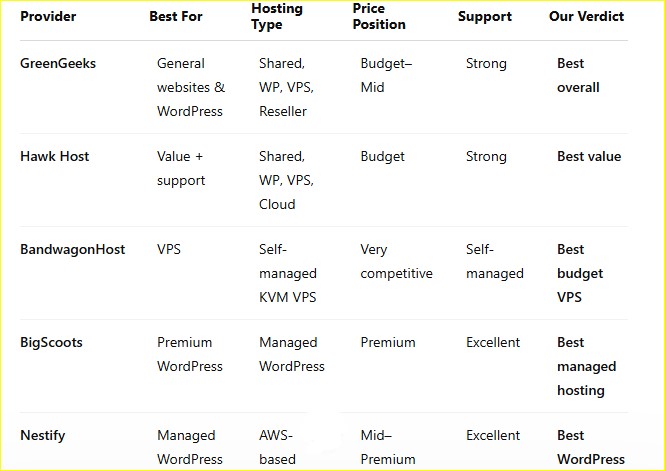
1. GreenGeeks — Best Overall for Most Website Owners
Best for: Small businesses, bloggers, WordPress websites, agencies and people who want a relatively easy hosting experience.
GreenGeeks is the provider I'd recommend first to the largest number of ordinary website owners.
Not because it has the cheapest headline price.
Not because it has the flashiest dashboard.
But because it sits in a useful middle ground.
You can start relatively small and still have access to WordPress hosting, reseller hosting and managed VPS options as your requirements increase.
Its current Trustpilot profile is also one of the stronger signals among the providers we reviewed: approximately 1,673 reviews, a 4.7 displayed rating and a 4.5 TrustScore. More importantly, recent 2026 reviews repeatedly mention responsive support, easy setup, migrations and help resolving technical problems.
That doesn't mean every customer is happy.
There are negative reviews too.
One recent customer specifically criticized the backup restoration experience, which is a useful reminder that "backups included" and "backups are effortless to restore" are not necessarily the same thing.
What do you actually get with GreenGeeks?
Depending on the plan, you can get:
- Shared hosting
- WordPress hosting
- Reseller hosting
- Managed VPS
- SSL
- Website migration
- Backups
- Security tools
- Email hosting
- CDN-related performance features
- 24/7 support
The company currently markets its entry shared hosting at around $2.95/month, but this is where we strongly recommend reading the renewal price before purchasing.
The first-year price is not the same thing as your long-term hosting cost.
Is GreenGeeks good for WordPress?
For a normal WordPress site, yes.
It's particularly appropriate if you want:
- A relatively easy setup
- cPanel
- WordPress installation tools
- SSL
- Backups
- Support when something goes wrong
- An upgrade path to VPS
It becomes less attractive if you're running a very demanding application and want maximum server-level control.
In that case, you're moving into VPS/cloud territory.
Is GreenGeeks actually fast?
For normal shared-hosting workloads, it can be perfectly adequate.
But don't make the mistake of assuming that buying a hosting plan automatically gives you a fast website.
Website speed also depends on:
- Theme quality
- Plugins
- Image sizes
- Database queries
- JavaScript
- Caching
- CDN configuration
- Server location
- Core Web Vitals
- Code quality
A badly built WordPress website on a fast server can still be slow.
Who should NOT choose GreenGeeks?
Don't choose it simply because it says "unlimited" everywhere.
If you're expecting very high traffic, running resource-heavy applications or need full root-level control, look at VPS/cloud options instead.
Also remember that promotional hosting prices can increase at renewal.
GreenGeeks verdict
Best for: General-purpose websites
Support: Strong
Beginner friendliness: High
Scalability: Good
Value: Very good
Our rating: 9.1/10
See current GreenGeeks coupons and offers : Greengeeks.geniecoupon.com
2. Hawk Host — Best Value if Support Matters to You
Best for: WordPress users, small businesses, developers, bloggers and customers who care about support without wanting premium managed-hosting prices.
Hawk Host is the provider I would describe as the quiet performer.
It doesn't have the same marketing footprint as some of the biggest hosting brands.
But the customer feedback is interesting.
Trustpilot currently shows 207 reviews, a 4.8 displayed rating and a 5/5 TrustScore. Around 80% of the reviews are five-star, and recent 2026 reviews repeatedly mention quick responses, helpful staff, stable service and good value.
One of the more interesting recent reviews comes from a customer who says they've used Hawk Host for almost 20 uninterrupted years.
That kind of long-term customer retention is more meaningful to me than a flashy "99.99% uptime" badge.
What does Hawk Host offer?
The current service portfolio includes:
- Shared hosting
- WordPress hosting
- Reseller hosting
- Semi-dedicated hosting
- VPS
- Cloud computing
- Domain registration
- SSL
- Email hosting
Hawk Host also operates infrastructure across multiple locations and advertises 24/7/365 support through email, helpdesk and live chat.
Why would I choose Hawk Host over a larger company?
Support.
That's the simplest answer.
When your website breaks at 11 PM and you're staring at a database error, a knowledgeable support team can be worth more than an extra 10GB of storage.
Recent customer reviews specifically mention fast ticket responses and staff who actually help troubleshoot problems.
There are negative reviews too, including occasional complaints about performance or outages.
That's normal.
The important question isn't whether a host has zero complaints.
No host does.
The question is whether the overall customer experience shows a consistent pattern of competent service.
For Hawk Host, the current evidence is encouraging.
Hawk Host verdict
Best for: Value + support
Beginner friendliness: High
Support: Excellent
Scalability: Good
Value: Excellent
Our rating: 9.0/10
See current Hawk Host coupons and offers : Hawkhost.geniecoupon.com
3. BandwagonHost — Best Budget VPS
We've already covered why BandwagonHost deserves the VPS spotlight.
But here's the short version.
If you're looking for:
- Full root access
- KVM virtualization
- Low-cost VPS infrastructure
- Multiple locations
- 1Gbps networking
- Snapshots
- Automatic backups
- OS reinstall
- Data-center migration
- Developer control
then BandwagonHost deserves to be on your shortlist.
Its current entry promotional VPS is $49.99/year.
That price is the attraction.
Self-management is the trade-off.
And that's the honest answer.
BandwagonHost vs shared hosting
This is one of the questions users should ask before purchasing.
Shared hosting
You get:
- Easier management
- Usually cPanel
- Hosting-company-managed server
- Less responsibility
- Lower technical barrier
VPS
You get:
- Root access
- More control
- More predictable resources
- Greater flexibility
- Ability to install your own software
But you also get:
- Server administration
- Security responsibilities
- OS updates
- Firewall configuration
- Web-server configuration
- Database administration
If you want control, VPS wins.
If you want convenience, shared or managed hosting wins.
Is BandwagonHost good for WordPress?
Yes — if you know how to manage a Linux VPS.
If you don't, I'd put GreenGeeks, BigScoots or Nestify ahead of it.
You can absolutely run WordPress on a BandwagonHost VPS.
But installing WordPress is the easy part.
Maintaining the server securely is the real job.
Is BandwagonHost good for developers?
This is where it becomes much more attractive.
A developer can use the VPS for:
- Web applications
- APIs
- Docker containers
- Development environments
- Databases
- WordPress
- Self-hosted tools
- Testing
- Private services
The full root access and KiwiVM controls provide the flexibility technical users expect.
BandwagonHost verdict
Best for: Technical users who want VPS control
Beginner friendliness: Low
Support model: Self-managed
VPS value: Excellent
Flexibility: Excellent
Our rating: 9.0/10 for technical users
See BandwagonHost coupons & VPS deals : Bandwagonhost.geniecoupon.com
4. BigScoots — Best if Your Website Makes Money
Best for: High-value WordPress websites, agencies, publishers, WooCommerce businesses and people who don't want to spend their evenings troubleshooting servers.
BigScoots is not cheap hosting.
And it shouldn't be judged like cheap hosting.
Its value proposition is:
Pay more so that somebody competent is available when your website needs help.
That can make a huge difference if your website generates revenue.
BigScoots describes itself as a fully managed hosting and site-performance provider, with 24/7 support and access to human experts. Its current customer-review profile is unusually strong: 147 Trustpilot reviews, 4.9 displayed rating, 5/5 TrustScore and 98% five-star reviews.
Recent customers include agencies and long-term website owners who specifically praise personalized technical support and performance.
Why would anyone pay $35+ for hosting?
Because sometimes hosting is not an expense.
It's infrastructure.
Imagine an online store that makes $500 in profit every day.
If the website goes down for eight hours, saving $20 on hosting isn't particularly clever.
The same logic applies to:
- Publishers
- Membership websites
- WooCommerce stores
- Lead-generation websites
- Agencies managing client sites
- High-traffic blogs
In those cases, fast and competent support can be worth considerably more than cheap storage.
What makes BigScoots different?
Its focus is on managed service, not simply server rental.
That means the provider can be much more involved in:
- WordPress performance
- Security
- Site migrations
- Infrastructure
- Troubleshooting
- Optimization
The customer-review pattern strongly supports this positioning.
BigScoots verdict
Best for: Business-critical WordPress
Support: Exceptional
Price: Premium
Beginner friendliness: High
Value: Excellent if downtime is expensive
Our rating: 9.3/10 for managed WordPress
See current BigScoots coupons and offers : Bigscoots.geniecoupon.com
5. Nestify — Best WordPress Specialist
Best for: Businesses and agencies that want managed WordPress hosting without having to become server administrators.
Nestify is another provider that deserves more attention than it usually gets.
Its WordPress hosting is built on AWS infrastructure and currently offers plans beginning around $19/month, with higher tiers at $35, $49 and $79/month. The company currently advertises a free first week and a 60-day refund guarantee.
But pricing isn't why it makes this list.
Support is.
Trustpilot currently shows more than 450 reviews, with 93% five-star reviews. Recent 2026 reviews repeatedly mention prompt and helpful support, including cases where support helped resolve WordPress update problems and restore websites.
There are negative reviews too.
For example, some users have complained about technical mistakes and account/data-management issues.
That's important to acknowledge.
A review score should be a signal, not a guarantee.
Who should choose Nestify?
Nestify makes sense if:
- You use WordPress
- Performance matters
- You want managed infrastructure
- You don't want to administer Linux
- You manage several websites
- You want human technical assistance
It makes less sense for:
- A simple static HTML site
- A developer who wants complete VPS control
- Someone choosing purely on lowest price
Nestify verdict
Best for: Managed WordPress
Support: Excellent based on current customer feedback
Price: Mid-to-premium
Technical barrier: Low
WordPress specialization: Excellent
Our rating: 9.0/10
See current Nestify coupons and offers : Nestify.geniecoupon.com
What About the Other 12 Hosting Providers?
This is where many "Best Hosting" articles become misleading.
A provider not appearing in our top five doesn't automatically mean it's bad.
Several of the remaining providers are excellent at a specific job.
Apex Hosting
If you're looking for Minecraft/game-server hosting, Apex Hosting belongs in a completely different comparison.
It shouldn't be judged against GreenGeeks for ordinary WordPress hosting.
Shockbyte
Another specialist option for game servers.
If your goal is running Minecraft or another supported game server, this becomes much more relevant.
PingPerfect
Again, primarily interesting for game-server hosting rather than conventional website hosting.
WhoGoHost
A particularly relevant option for Nigeria and African markets, especially where local infrastructure, pricing and regional support matter.
Tasjeel
One of the strongest regional providers in the entire category.
Tasjeel currently has around 1,954 Trustpilot reviews and a 4.9 displayed rating, with many recent UAE customers praising fast support and service.
If you're operating a business in the UAE, I would absolutely compare Tasjeel before blindly choosing a US-based global host.
ASEOHosting
A specialist option for SEO hosting and multiple-IP requirements.
Not something the average website owner needs.
WebCare360
More interesting for specialized VPS, dedicated and offshore hosting requirements.
Digital VM
More appropriate for technical users looking at VPS infrastructure.
HostKey
Another VPS/server-oriented provider that becomes more relevant when you need root access and dedicated resources.
HostSailor
Also more interesting for VPS users than someone simply launching their first WordPress website.
The Hosting Question Nobody Should Ignore: Shared Hosting or VPS?
This is probably the most important decision in the entire article.
You don't necessarily need the most powerful hosting.
You need the right level of hosting.
Choose shared hosting if:
- You're launching your first website
- You have a blog
- You have a small business website
- Your traffic is modest
- You don't want server administration
- You want cPanel
- You want the host to handle most server maintenance
GreenGeeks or Hawk Host would be the first places I'd look.
Choose managed WordPress hosting if:
- You're using WordPress
- Performance matters
- You don't want to manage a server
- Your website generates leads or revenue
- You want expert WordPress assistance
Look at:
BigScoots or Nestify.
Choose a VPS if:
- You need root access
- You need custom software
- You want Docker
- You need server-level configuration
- You understand Linux
- You need more predictable resources
- You're comfortable securing and maintaining a server
Look at:
BandwagonHost.
How Much Should You Actually Spend on Hosting?
You don't need to spend $50/month just because someone says premium hosting is better.
For a new website:
$3–$10/month
Usually enough for:
- Blog
- Small business website
- Portfolio
- New WordPress site
$10–$30/month
Makes more sense when:
- Traffic grows
- You need more resources
- You run multiple websites
- You want better performance
- You need additional infrastructure
$30–$100+/month
Makes sense when:
- Your website generates meaningful revenue
- Downtime costs money
- You need managed WordPress
- You need dedicated resources
- You need premium support
$50/year VPS
Can be incredibly attractive — if you know what you're doing.
That's where BandwagonHost stands out.
What About Hosting Renewal Prices?
This is one of the biggest traps in the hosting industry.
A provider may advertise:
$2.95/month
But that might be a promotional price tied to a specific billing term.
The renewal price can be significantly higher.
So before buying hosting, always ask:
"What will I pay after the promotional period ends?"
Do the calculation for:
Year 1 + Year 2 + Year 3
rather than comparing only the first checkout price.
Does "Unlimited Bandwidth" Mean Unlimited?
Not necessarily in the way beginners think.
Hosting companies often use "unlimited" as part of a shared-hosting resource model.
That doesn't mean you can run an application consuming enormous CPU, RAM, disk I/O and network resources indefinitely.
Always read the provider's acceptable-use and resource policies.
For VPS hosting, the situation is usually clearer because the plan specifies a monthly transfer allocation.
For example, BandwagonHost's current VPS plans explicitly specify monthly transfer amounts.
What Should You Look for in Customer Reviews?
Don't look only at the star rating.
Look for patterns.
Ask:
Do customers mention support?
If yes, what do they say?
Do customers mention outages?
How frequently?
Do long-term customers remain?
A customer who has stayed for 5–10 years can provide a different signal from somebody who signed up yesterday.
Are complaints about the product or billing?
These are very different problems.
Does the company respond?
A provider responding professionally to negative reviews doesn't make the complaint disappear, but it gives you useful information about how the company handles problems.
Our Final Web Hosting Recommendations
After comparing the 17 providers in GenieCoupon's Web Hosting category, this is how we'd simplify the decision.
🏆 Best overall for most websites
GreenGeeks
A strong balance of features, usability, support and upgrade options.
Best for: Most small businesses, bloggers and WordPress users.
💰 Best value
Hawk Host
A less-hyped provider with an impressive current customer-support reputation.
Best for: Users who value support and don't want premium pricing.
🖥️ Best budget VPS
BandwagonHost
Exceptional value for users who know how to manage a VPS.
Best for: Developers and technical users.
Not ideal for: Complete beginners.
👨💻 Best premium managed WordPress
BigScoots
The choice when your website is important enough that support quality matters more than saving a few dollars.
Best for: Agencies, publishers, WooCommerce and revenue-generating websites.
⚡ Best managed WordPress alternative
Nestify
A strong AWS-powered WordPress specialist with a particularly strong current customer-support signal.
Best for: WordPress businesses and agencies.
One Last Piece of Advice Before You Buy
Don't ask:
"Which hosting company is the best?"
Ask:
"Which hosting model is right for my website?"
If you're building your first website, you probably don't need a VPS.
If you're running a serious WordPress business, the cheapest shared plan may become a false economy.
If you're a developer, paying for managed hosting when you could comfortably run your own VPS may not make financial sense.
And if you are considering BandwagonHost, don't buy it simply because $49.99/year looks amazing.
Buy it because you understand what a self-managed KVM VPS actually means.
That is the difference between a hosting purchase that saves you money and one that gives you another technical problem to solve.
Frequently Asked Questions
Which is the best web hosting provider in 2026?
For most ordinary websites, we would start with GreenGeeks because it offers a broad combination of hosting options, WordPress support, features and customer support.
For technical VPS users, BandwagonHost is a particularly attractive option.
For managed WordPress, BigScoots and Nestify deserve serious consideration.
Is BandwagonHost good?
Yes, particularly if you understand VPS administration.
Its current entry KVM VPS starts around $49.99/year and includes root access, KVM virtualization, 1GB RAM, 2 CPU cores, 1TB monthly transfer and 1Gbps networking.
The major limitation is that it is self-managed.
Is BandwagonHost suitable for beginners?
Not usually.
If you want someone to handle server configuration, security and application-level problems, choose managed hosting instead.
Is BandwagonHost managed VPS?
No.
Its standard VPS service is explicitly self-managed. BandwagonHost provides infrastructure and VPS management controls, but it generally does not configure your applications for you.
Does BandwagonHost offer a refund?
Yes.
It currently offers a 30-day money-back guarantee subject to its terms and eligibility requirements.
Which is better: shared hosting or VPS?
Shared hosting is easier.
VPS gives you more control.
If you're not comfortable managing Linux servers, start with shared or managed hosting.
If you are comfortable managing servers, a VPS can provide substantially more flexibility.
Is cheap web hosting worth it?
Yes — if you choose it for the right website.
Cheap hosting is perfectly reasonable for a new blog or small business site.
The mistake is expecting a $3/month shared hosting account to provide the same resources, isolation and support as a $50/month managed infrastructure service.
What is the best hosting for WordPress?
There isn't one universal answer.
For general WordPress hosting, GreenGeeks is a strong starting point.
For premium managed WordPress, consider BigScoots.
For AWS-powered managed WordPress, Nestify is worth comparing.
For technically capable users who want full control, a BandwagonHost VPS can run WordPress very effectively — but you manage the server.
Should I buy hosting for one year or three years?
Compare the total cost.
Longer billing periods can produce a lower monthly promotional price, but they also mean committing more money upfront.
Calculate the actual first-term cost and the renewal cost before deciding.
Does more RAM automatically make hosting faster?
No.
RAM is only one part of server performance.
CPU performance, storage, I/O, network quality, server load, software configuration and your website's code all matter.
For VPS hosting, also pay attention to CPU allocation, storage type, network route and bandwidth, not only RAM.
Can I move my website to another host later?
Usually, yes.
But migration difficulty depends on the platform.
Before buying hosting, check whether the provider offers:
- Website migration
- cPanel backup/restore
- Database export
- SSH/SFTP access
- DNS control
- Full backups
A hosting company should never become a permanent prison for your website.
The Short Answer
If you don't want to read the entire comparison:
Starting a normal website? → GreenGeeks
Want value and good support? → Hawk Host
Want an affordable VPS and know Linux? → BandwagonHost
Running a serious WordPress business? → BigScoots
Want managed AWS-powered WordPress? → Nestify
Running a UAE-focused business? → Also compare Tasjeel
Running a game server? → Look at the specialist providers such as Apex Hosting, Shockbyte and PingPerfect.
The best hosting provider isn't the company with the biggest advertisement.
It's the one that gives you the resources, control, support and upgrade path your website actually needs.